About Travel Notes™ Budget Travel City Guides Countries Feedback Regional Travel Videos Travel Writing

Car Hire Cruises Flights Hostels Hotels RTW Tours Vacations Weather Where To
Google+ Travel Notes on Google Plus Add URL to Travel Notes - Advertise on Travel Notes - Link To Travel Notes - New Listings - Travel Blogs - Travel News - Travel Twip - Travel on Twitter.
Subscribe to the Travel Notes Blog Travel Notes: Travel Notes Blog

A Twittering Must Have

Friday, January 23, 2009

The Official Travel Notes Blog

Useful Twitter Tools on The TravelNotes Toolbar:

As tweets need to be under 140 characters in length, it makes sense to use an URL shortening service when posting links to something worth tweeting about.

We have added tinyurl and bit.ly to the Travel Notes toolbar; so that users can create a short URL when they are visiting a page they want to Twitter about.

The bit.ly service even lets you track clicks (just put a + after the link).

These are located in the drop-down Travel menu - then Web Tools.

Long URL Please is also in there; handy for revealing all those shortened URLs - posted by others - when you're on a Twitter page.

And just to complete the experience; with 'Twitter' selected from the search box choices, you can easily search tweets when you're on another website.

You may also choose to search for 'Twitter Users'; and even select to 'Tweet From Toolbar' when a thought occurs to you (or highlight text on a webpage and press go).

You could even leave the 'Tweet From Toolbar' search field blank and press go, to tweet that you're tweeting from the toolbar.

To get to your own Twitter page from the toolbar, clear the toolbar search box and - with Twitter selected - just press go.

Toolbar users can also search bit.ly, Blinkx, Brightcove, Clip Syndicate, Daily Motion, Delicious, Digg, Facebook, Flickr, Gmail, MySpace, Technorati, Travelistic, TurnHere, WhosTalkin? and You Tube - as well as a host of travel-related sources.

Not to mention listen to Live Streaming Internet Radio and watch popular tv programs for free.

Just message me on Twitter (or through the toolbar) if you'd like to see anything else added.

Download The TravelNotes Toolbar.

Technorati Tags: ,

Labels: ,

Quick Tour of The Travel Notes Toolbar

Tuesday, August 21, 2007

The Official Travel Notes Blog

- The logo is the direct link to the Travel Notes homepage; especially useful if you want to run a quick flight search or get to one of our other sections from the front page.

- The pull-down arrow, beside the logo, presents you with a list of toolbar options.
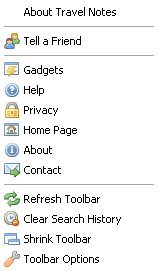

As we improve the toolbar, there's no need to install an 'upgrade'; just refresh the toolbar and you'll be where we are.


Using The Travel Notes Toolbar Search

The quickest way to search is just type your keywords into the search box and use the power of Google.

On the search-returns page, you'll also get links to other search resources we think are useful. No need to type the search terms again, just click the link you want to re-try the search on.

- Alternatively, you could click on the arrow in the search box to select the particular source you want to use, to get to your destination faster.
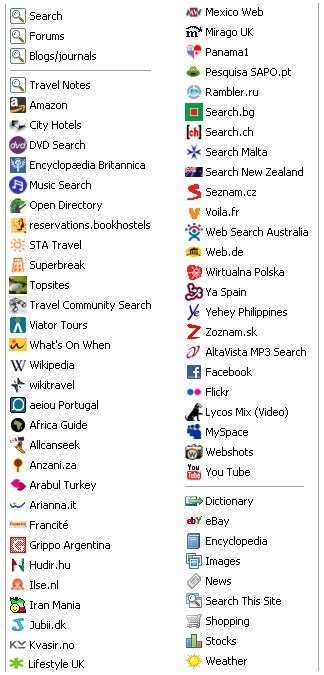

We'll be adding more regional and country-specific search engines to the list.

The 'Travel Community Search' actually searches across up to ten authoritative travel sites. We can always change the sources we use, if needed.

- To set the search rolling, you can either click Go or 'press enter' on your keyboard.


Highlighting Text

- The highlighter on the toolbar is dimmed by default.

- The highligter glows when you select some text on a webpage, or have something in the search box. Selecting text on the webpage also enters it in the search box.

You can then click on the glowing arrow, to find out how many times the selected text appears on the page.

- Or you can click Go and search for the highlighted term.


Travel, Notes and New

- The 'Travel' menu takes you to our country pages, where you can find all the latest travel notes and related links. There's also an option to 'Add to Travel Notes', right at the top.

- The 'Notes' option allows us to stay in contact with our users and our users to reply to us, right from their browser.

- While the 'New' section keeps you up-to-date with all the latest RSS feeds from some of the best travel articles being written on the Internet.


Radio

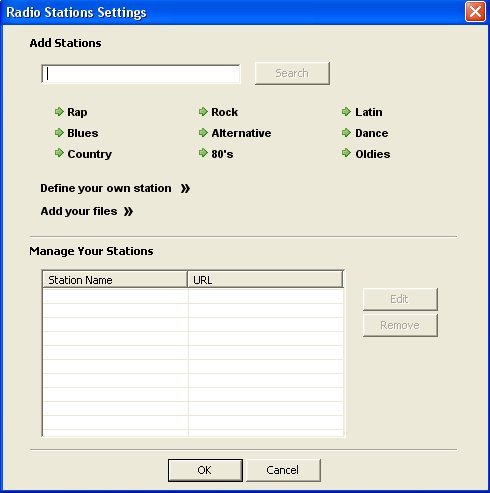
- I've already pre-tuned the radio with music stations from around the world.

While we'll be expanding this list, you can also add your own radio stations, or files from your computer, to personalise 'your' radio even more.


Visual Media and Chat

- This is where we have international television, with live streaming, and a collection of travel vidoes.

- The 'Travel Photography' section is for professionally illustrated travel features.

- The online chat opens up in a new browser window. To be honest, we'll need more toolbar downloads for this feature to be a success.


And Finally

- There's only so much we can fit on a toolbar, without it all getting messy and confusing, so tucked away on the right is access to your e-mail notifier settings, pop-up blocker and live weather.

It's also where the 'gadgets' get stored.


The weather symbol is a dynamic weather icon according to the current weather conditions where you are.

As you can see, it was quite cool outside when I took the screen shot.

Click on your dynamic weather icon in the toolbar and you can get quick access to weather conditions for anywhere in the world.

Privacy - Toolbar Help - Toolbar Privacy - Uninstall Instructions

=============
Toolbar Feedback
=============

I look forward to your toolbar feedback; especially suggestions for other search engines, radio stations, visual media and gadgets to add - or what's not working and might need deleting.

Go to Download Page - or download the toolbar for your preferred browser direct from here:

Toolbar Download For Internet Explorer

Toolbar Download For Firefox

Labels: ,

TravelNotes Toolbar

Friday, August 17, 2007

The Official Travel Notes Blog

I've been working away behind the scenes on a new feature for the travel community.

Now you can get to your destination faster with the TravelNotes Toolbar.

Download our personalised toolbar for all the latest travel news (from a variety of influential sources), links, features and special discounts; available to toolbar users only.

You can narrow down the millions of Google search returns with our pre-selected 'quality' travel domains (and we're looking at more), or use the full power of Google if you prefer.

Make good use of your time online with quick access to the best in travel, with speciality search engines at your fingertips and a pre-tuned, world radio; where you can also add your own favourite stations or music files.

Our ideal is to give you the toolbar that you not only want, but a toolbar you need, enjoy and just can't be without!

Downloads are available for Internet Explorer and Firefox (Mac users too) and more features are planned; especially when we hear your feedback.

So let me know what you think - straight from the TravelNotes Toolbar itself.

Labels: ,

Regional Directory - Search The Web - Subscribe to Updates.

Travel Notes Hub

Travel Articles

Michel Guntern on Facebook
TravelTweet on Twitter

Search City Hotels

Search 1800-Hostels


Follow This Blog on Facebook

Join the founder of Travel Notes on Facebook Connect With Travel Notes

Add to Flipboard Magazine

Car Hire Cruises Flights Hostels Round-The-World Specials Tours Vacations
TravelNotes.org: Travel Notes Blog - Toolbar